Tameer ka hisaab, shirakat ke saath

The books for building and selling houses in partnership.

Partners pool a seed fund, buy a plot, build, and sell. Phoenix Mimaar records every rupee by voice in Urdu or English, splits each cost by share, and gives you a trial balance, balance sheet and profit sheet the day the house is sold.

Free to start · 14-day Pro trial · Pro from Rs 2,500 a month on the yearly plan
  1. Pool the seed fundEach partner's share is set once. Capital is recorded as it arrives.
  2. Buy the plotPrice, 236K advance tax, stamp duty, registration and transfer fee.
  3. Build stage by stageGrey structure, wood, tile, plumbing, electrical, paint: material and labour kept apart.
  4. Sell and share the profitCommission and 236C recorded, Rs 50,000 held for buyer claims, profit split by share.
What it does

Everything the accountant of a building group keeps, on one phone.

Made for groups of partners in Quetta, Karachi, Lahore, Islamabad and every city in between. No accounting training needed.

Bolein, Mimaar likh lega

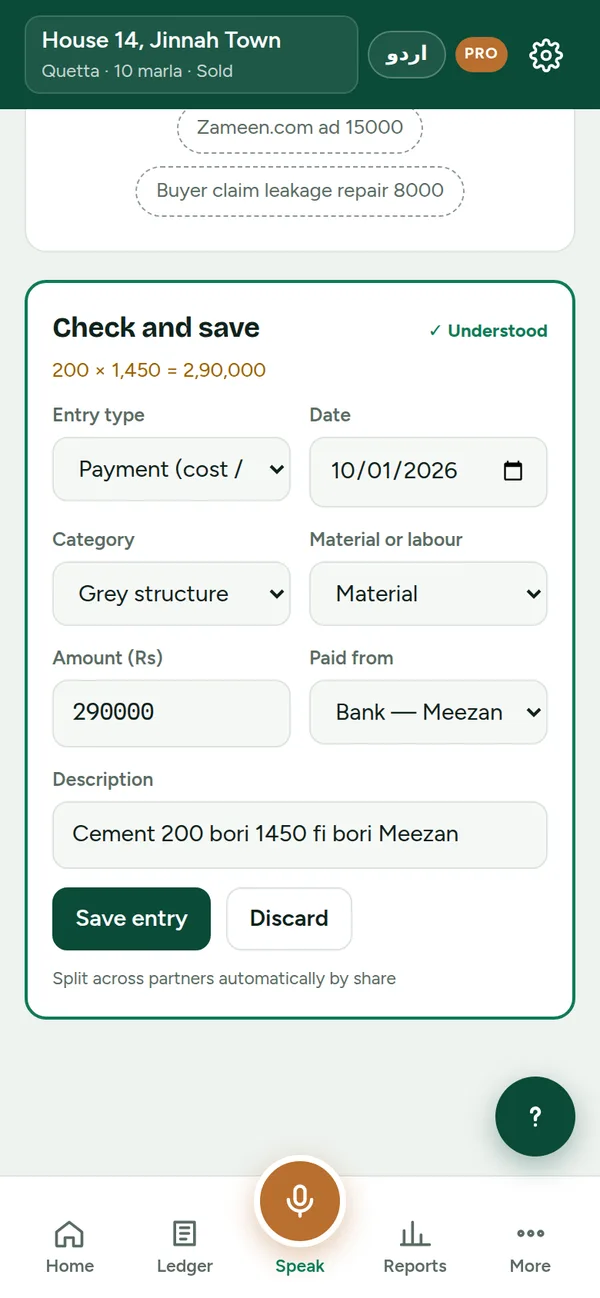
Tap the mic and say the payment the way you would tell a partner. Mimaar works out the amount, the stage, material or labour, and which bank or wallet paid. You check it, then save.

“Cement 200 bori 1450 fi bori Meezan” → Rs 2,90,000 · Grey structure · Material · Meezan Bank
“Mistri ki mazdoori 45 hazar” → Rs 45,000 · Labour
“Meezan se JazzCash mein 50 hazar” → Transfer between accounts

Partner shares, automatically

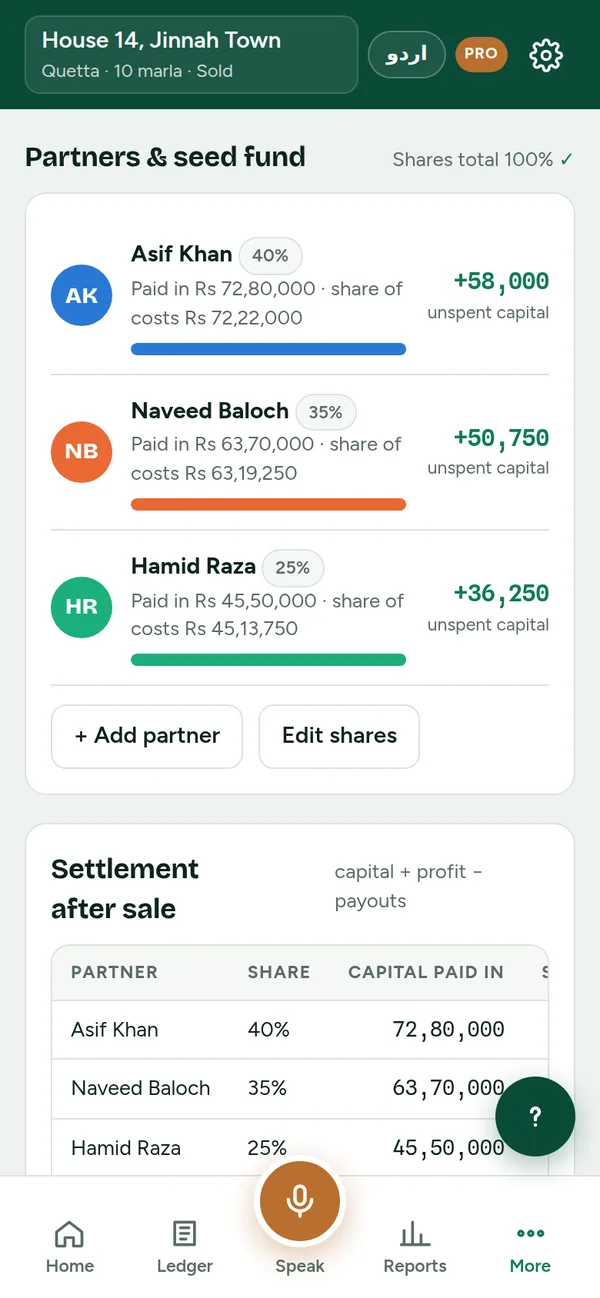
Every payment is split by each partner's % as it happens. See who has paid in more and who still owes, at any moment.

Proper books, not just a list

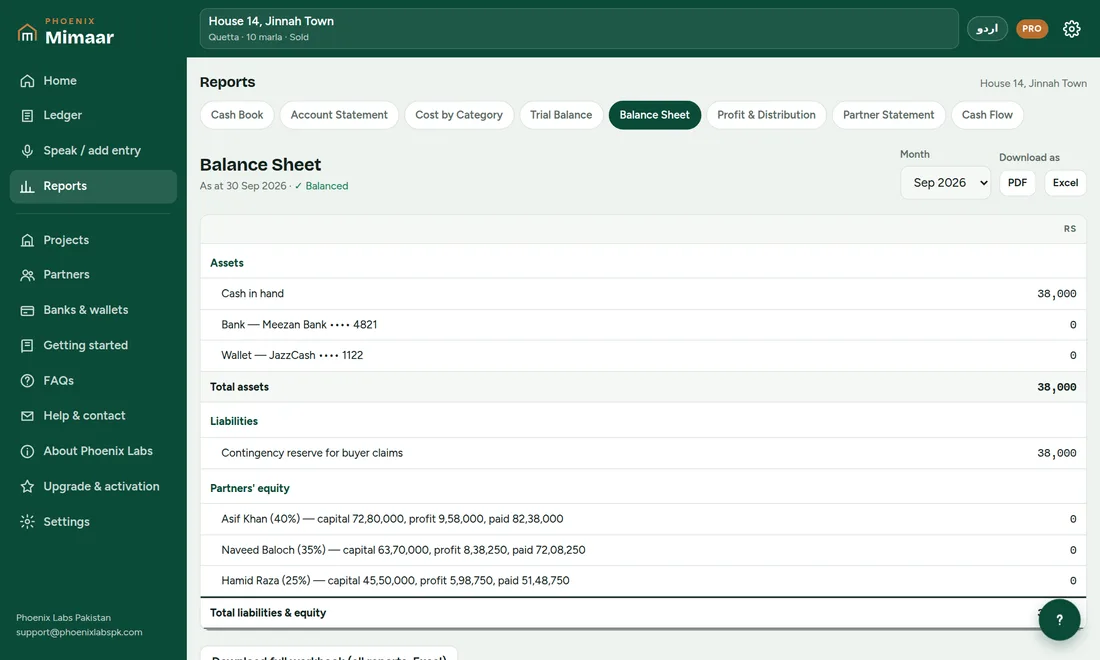
Two-column cash book, trial balance, monthly balance sheet, profit and distribution, partner statement and cash flow. All of them balance.

Banks and wallets

Meezan, HBL, Alfalah and every Pakistani bank, plus JazzCash, Easypaisa, NayaPay and SadaPay. Each has its own statement.

PDF and Excel in one tap

Share reports on WhatsApp with partners, or open the full workbook in Excel for your auditor.

Rs 50,000 contingency

Hold back money after the sale for leakage, paint or other buyer claims, pay claims from it, and distribute what is left.

English or Roman Urdu

Switch the whole app with one button. A voice guide sets up your first house in five minutes and answers questions.

Your data stays with you

Books are stored on your phone or PC, not on our servers. Download a backup file any time and restore it on any device.
See it

Real screens from the app.

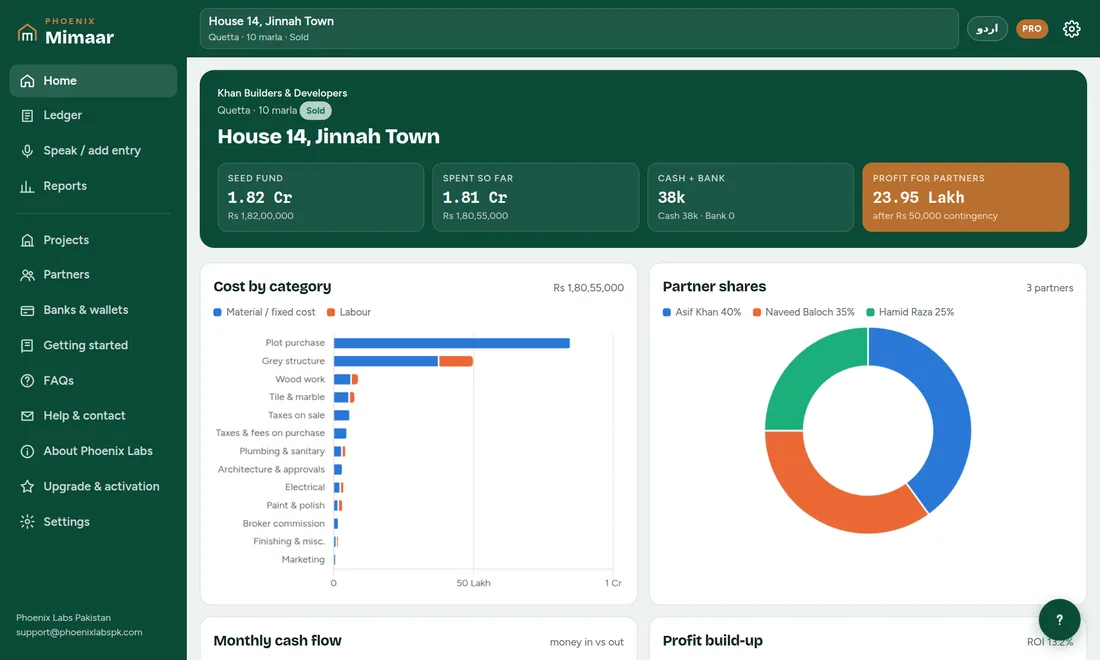
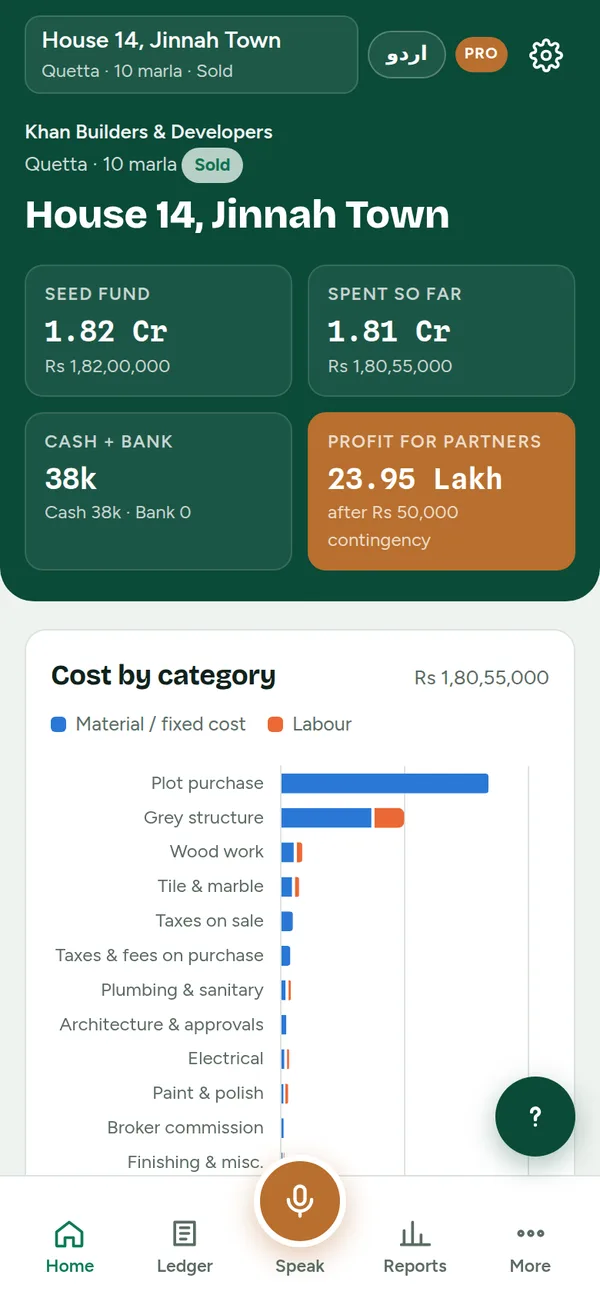
Project dashboard with seed fund, spending, balances and profit
Every house at a glance
A spoken cement purchase understood and ready to save
Speak, check, save
Partners with shares and funding position
Who paid what
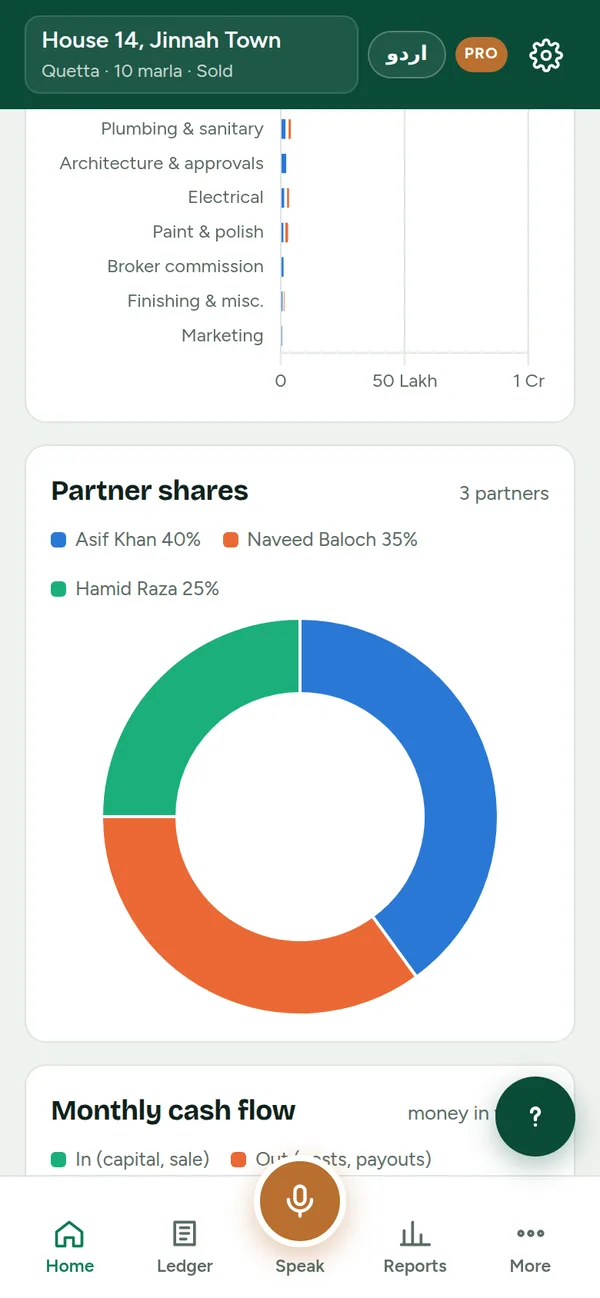
Charts of cost by category and partner shares
Costs and shares in charts
Monthly balance sheet on Windows
Pricing

Start free. Pay when it earns its keep.

Free
Rs 0
  • 1 house, up to 2 partners
  • 40 entries a month
  • 1 bank account and 1 wallet
  • Voice entry, cash book, cost report
  • PDF reports with a watermark
Pro · Monthly
Rs 2,999 / month
  • Unlimited houses, partners and entries
  • Trial balance and monthly balance sheet
  • Partner statements and profit distribution
  • Clean PDF and Excel workbooks
  • Unlimited banks and wallets
BEST VALUE
Pro · Yearly
Rs 29,999 / year
Save Rs 5,989 · about 2 months free
  • Everything in Pro Monthly
  • Works out to about Rs 2,500 a month
  • 12 × monthly would be Rs 35,988
Try every Pro feature free for 14 days.Tap “Start free trial” inside the app. No payment needed, and nothing you enter is lost when the trial ends.
Download

Phoenix Mimaar 1.0

Use it on your phone at the site and on the office PC. Move your books between them with a backup file.

Android

For most Android phones from the last several years.

Download APK For older phones (32-bit)
  1. Open the downloaded file.
  2. If asked, tap Settings → Allow from this source.
  3. Tap Install, then open Phoenix Mimaar.

Windows

Windows 10 and 11. Uses Microsoft Edge, already on every PC.

Download for Windows
  1. Run PhoenixMimaar-Windows.exe.
  2. If Windows shows “Windows protected your PC”, click More info → Run anyway.
  3. It installs itself and adds a Desktop shortcut.

Google Play

COMING SOON

Phoenix Mimaar is on its way to the Play Store. Until then, use the Android download here; your books will carry over.

How to pay

Bank transfer, then an activation code.

Pay from any bank app, JazzCash, Easypaisa or a branch. Your device ID is in the app under Settings → Plan & activation.

  1. Transfer Rs 2,999 (monthly) or Rs 29,999 (yearly)to the Phoenix Labs Pakistan account shown here.
  2. Send us the payment screenshot and your device IDon WhatsApp 0334-5000287 or support@phoenixlabspk.com. The app writes the message for you.
  3. We send your activation codeusually within a few hours during office time.
  4. Paste the code in the appPro switches on straight away for your plan period.
Bank Alfalah (Islamic)Falah Islamic Current Account
Account title
PHOENIX LABS PAKISTAN
Account number
57585003089434
IBAN
PK79ALFH5758005003089434
Branch
IBG Airport Road, Quetta (5758)
SWIFT
ALFHPKKAXXX

Only pay into this account. We never ask for your card number or PIN.

Questions

Asked by builders before they start.

Can I run several houses at once?

Yes. Each house is its own project with its own partners and reports. The free plan includes one house; Pro has no limit.

Do my partners need the app?

No. One person keeps the books and shares PDF or Excel reports with the partners on WhatsApp.

Does it work without internet?

Yes. Everything is saved on your device. Voice input may need internet on some phones and on Windows; typing always works.

Does it calculate 236K and 236C tax for me?

You record the amount you actually paid. Rates change with each budget and depend on filer status, so confirm the amount with your tax adviser.

Can I use the same books on my phone and PC?

Yes. In Settings, download a backup file on one device and restore it on the other. Automatic sync is planned for a later version.

What if I lose my phone?

Download a backup file regularly and keep it on Google Drive or WhatsApp. Restore it on the new phone and carry on.

Is my Pro plan renewed automatically?

No. Pro runs until the end of the period you paid for. Pay again to renew; the app reminds you ten days before.